Licensing
Energy Logserver uses file-based licensing. Each license consists of two matching files (.license and .info) that must be placed in the installation directory during initial setup or updated together via the GUI on a running system.
License Plans
Energy Logserver is available in the following plans:
Log Management Plan (LMP) — base platform for centralized log management and operational monitoring
SIEM Plan — add-on package extending LMP with SIEM capabilities (requires additional license)
Network Probe — add-on package for network traffic analysis, available in configurable node count (requires additional license)
AI Assistant — add-on enabling LLM-based features in Discover (requires additional license)
MSSP — mode for managed service providers enabling multi-tenant source management (requires additional license)
License Files
Each Energy Logserver license is delivered as two matching files that share the same es_<timestamp> prefix:
File |
Purpose |
|---|---|
|
Encrypted license payload that the platform validates at runtime |
|
Metadata used by |
Both files must be supplied together. Each file is at most 1024 bytes. After installation, the active files live in /usr/share/elasticsearch/license/ owned by logserver:logserver.
Initial License Installation
During installation, copy both license files to the install directory before running the setup script:
cp es_*.license es_*.info install/
cd install
./install.sh -i
Note
Both .license and .info files must be present before running install.sh. The installer aborts with I cannot find the license file if either file is missing. This applies to interactive (-i) and non-interactive (-i -n) installations.
Viewing License Information
License details are available in the GUI under Config → License.
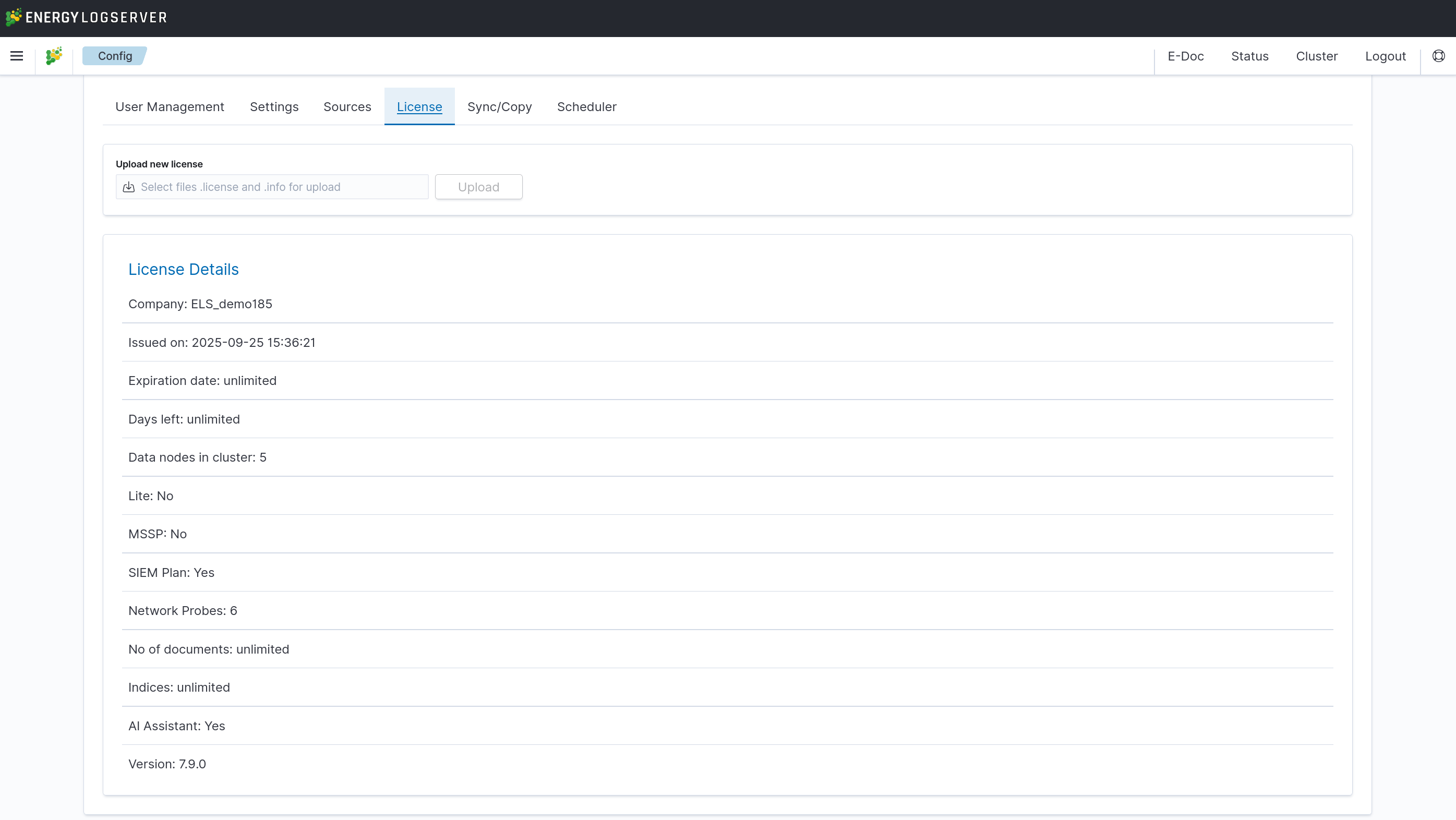
The License tab displays the following read-only fields:
Field |
Description |
|---|---|
Company |
Organization that owns the license |
Issued on |
License issue date |
Expiration date |
License validity period ( |
Days left |
Remaining days until expiration |
Data nodes in cluster |
Maximum number of ELS Data Nodes allowed in the cluster |
Lite |
Whether the SIEM Lite variant is active |
MSSP |
Whether MSSP mode is licensed |
MSSP Sources |
Number of licensed MSSP sources (shown when MSSP mode is enabled) |
SIEM Plan |
Whether the SIEM add-on is active |
Network Probes |
Number of licensed Network Probe instances |
No of documents |
Maximum document count ( |
Indices |
Maximum number of indices ( |
AI Assistant |
Whether the AI Assistant add-on is active |
Version |
Maximum supported platform version |
Updating the License
To upload a new or renewed license file on a running system:
Navigate to Config → License tab.
In the Upload new license section, select both the
.licenseand.infofiles. The files must match the naming patternes_<timestamp>.[license|info]and must not exceed 1024 bytes each.Click Upload. The server validates the files and returns a preview of the new license.
Review the side-by-side comparison of the current and new license parameters:
Fields highlighted in green indicate upgraded parameters.
Fields highlighted in red indicate downgraded parameters. If any parameter is downgraded, a red warning banner is displayed: “The new license is more restrictive than the old one.”
Click Submit to deploy the new license, or Abort to cancel.
A notification “New license submitted successfully” confirms the deployment. Verify the updated fields in the License tab.
Note
No system restart is required when updating the license through the GUI.
Updating the License via CLI
To replace the license files directly on the filesystem (e.g. in environments without GUI access):
Back up the current license files:
cp /usr/share/elasticsearch/license/es_*.license /tmp/license_backup/
cp /usr/share/elasticsearch/license/es_*.info /tmp/license_backup/
Copy the new license files to the license directory:
cp es_*.license es_*.info /usr/share/elasticsearch/license/
Set correct file ownership:
chown logserver:logserver /usr/share/elasticsearch/license/es_*.*
Warning
Without correct file ownership, the ELS Data Node service cannot read the license files and will fail to start or reload.
Reload or restart the ELS Data Node service:
Option A — Hot reload (recommended for production, no downtime):
curl -u $USER:$PASSWORD -X POST "http://localhost:9200/_logserver/license/reload"
Option B — Full service restart:
systemctl restart logserver
Verify the updated license in Config → License.
Warning
Expired License — Emergency License Upload
When the license expires, access to both the GUI and the REST API is blocked and normal login is not possible. To upload a new license without logging in, navigate directly to:
https://<ui-ip>/license_upload
This URL remains accessible regardless of license status and allows uploading
new .license and .info files to restore system access.
After uploading the new license, verify that all services have reloaded it:
POST /_logserver/license/reload
The reload command must be executed from an SSH console, not from the GUI.
Alternatively, check the license status page in the GUI after regaining access. To avoid service interruption, it is recommended to renew the license before it expires.
License Service
Energy Logserver includes a dedicated license-service component that validates add-on licenses at runtime. It is required when the Network Probe or SIEM Plan add-ons are licensed.
Property |
Value |
|---|---|
Installation path |
|
Configuration file |
|
Service name |
|
Start or restart the service:
systemctl start license-service
systemctl status license-service
The license-service operates in one of the following modes, configured via the mode directive in license-service.conf:
NETWORK_PROBE — validates Network Probe license and manages probe registration (default)
SIEM_PLAN — validates SIEM Plan license
ALL — validates both add-on types
Key configuration directives in license-service.conf:
Directive |
Description |
|---|---|
|
Operating mode ( |
|
ELS Data Node connection endpoints (default: |
|
Authentication username for the ELS Data Node |
|
Authentication password for the ELS Data Node |
|
Enable HTTPS communication with the ELS Data Node |
|
Enable HTTPS for the license-service API |
|
License status refresh interval in seconds (default: |
Note
The license-service is installed automatically as part of the Network Probe or SIEM Plan setup. It does not need to be installed separately.
License Renewal
Contact your vendor support to obtain a renewed license file. Apply it using the upload procedure described above.
License Compatibility Across Versions
Licenses are forward- and backward-compatible across Energy Logserver releases starting from version 7.4.0. An existing license issued for an earlier 7.x version continues to work after upgrading to 8.0 — no license replacement is required to complete the upgrade itself.
A new license is only needed when enabling add-on features introduced in a later release (for example, the AI Assistant key added with 7.9 / 8.0). In that case, perform the upgrade first, then upload the new license through the GUI as described in Updating the License. Uploading a newer license to an older version via the CLI is also supported, but the GUI upload form on pre-8.0 versions may reject licenses containing new keys — upgrade first, then upload.